


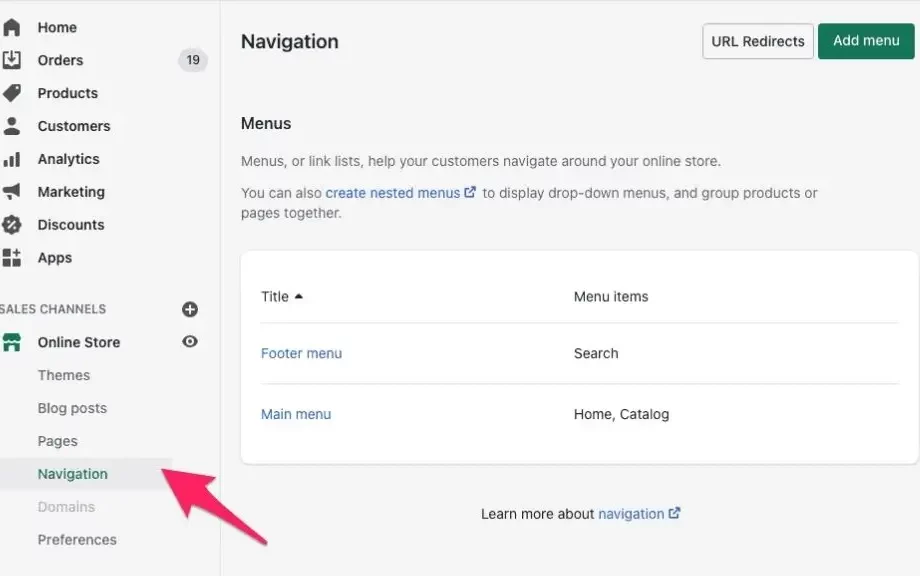
A well-optimized Shopify navigation menu is one of the most important factors for a successful online store. Properly structured Shopify menus improve user experience (UX), help customers find products quickly, and encourage more sales. In this guide, we’ll explain how to optimize your Shopify navigation menu to create an intuitive, seamless shopping experience.
Why Optimizing Shopify Navigation Matters
The Shopify navigation is the roadmap for your store visitors. If your Shopify menus are cluttered or confusing, customers may leave without completing a purchase. Benefits of an optimized Shopify navigation menu include:
-
Faster product discovery and browsing
-
Improved user satisfaction and engagement
-
Reduced bounce rates
-
Better search engine optimization (SEO)
Optimizing Shopify menus ensures your store is easy to navigate while supporting your marketing and sales goals.
Step 1: Analyze Your Current Navigation
Before optimizing your Shopify menu, review your existing navigation:
-
Are all menu items relevant and useful?
-
Are subcategories properly grouped?
-
Do the names of menu items clearly describe their destination?
Answering these questions helps you identify areas for improvement in your Shopify navigation menu.
Step 2: Simplify Top-Level Menu Items
Limit top-level items in your Shopify navigation to 5–7 key links. Too many options can overwhelm visitors. Focus on important pages like:
-
Shop or Collections
-
New Arrivals
-
Bestsellers
-
About Us
-
Contact
A concise Shopify menu makes browsing easier and highlights essential store sections.
Step 3: Organize Subcategories with Dropdown Menus
Dropdown menus improve organization for larger stores. For example:
-
Shop > Women > Dresses
-
Shop > Men > Shoes
Nesting related items under parent categories keeps your Shopify navigation menu clean while allowing access to more options. Proper organization helps customers find products faster and reduces frustration.
Step 4: Use Descriptive and Consistent Labels
Clear, descriptive labels on your Shopify menus improve UX. Instead of generic labels like “Products,” use:
-
“Men’s Shoes”
-
“Women’s Accessories”
-
“Summer Collection”
Consistency in labeling ensures visitors understand exactly where each menu item will take them.
Step 5: Highlight Important Pages or Promotions
Prominently feature high-priority pages or promotional collections in your Shopify navigation menu. For example:
-
“Sale” for seasonal discounts
-
“New Arrivals” for the latest products
Highlighting key items draws customer attention and drives engagement.
Step 6: Customize Appearance for Better Usability
Many Shopify themes allow customization of Shopify menus:
-
Adjust fonts and colors for visibility
-
Add icons or images for quick recognition
-
Ensure dropdowns are easy to access on mobile devices
A visually appealing Shopify navigation menu supports UX and reinforces brand identity.
Step 7: Test Your Optimized Navigation
After optimizing your Shopify menu:
-
Preview your store on desktop and mobile devices.
-
Click through all links to confirm they work correctly.
-
Ask friends or colleagues to navigate the store and provide feedback.
Testing ensures your Shopify navigation is functional, intuitive, and user-friendly.
Best Practices for Optimized Shopify Menus
-
Keep the top-level menu concise (5–7 items)
-
Use dropdowns to organize subcategories
-
Employ descriptive and consistent labels
-
Highlight key pages and promotions
-
Update menus regularly as new products or collections are added
Conclusion
Optimizing your Shopify navigation menu is essential for creating an online store that is easy to use, visually appealing, and conversion-focused. By simplifying top-level items, organizing subcategories, using clear labels, and highlighting important pages, you can enhance user experience, increase engagement, and drive sales. A well-structured Shopify menu ensures visitors can navigate your store effortlessly and find what they are looking for quickly.
 :
https://in.pinterest.com/liquidwebdevelopers/
:
https://in.pinterest.com/liquidwebdevelopers/









